World Heritage Map Quiz
2026-03-25
Introduction
A quiz app where you tap the map to guess the locations of World Heritage Sites — World Heritage Map Quiz.
I originally built this for studying for the World Heritage certification exam on my own PC, and decided to deploy it.
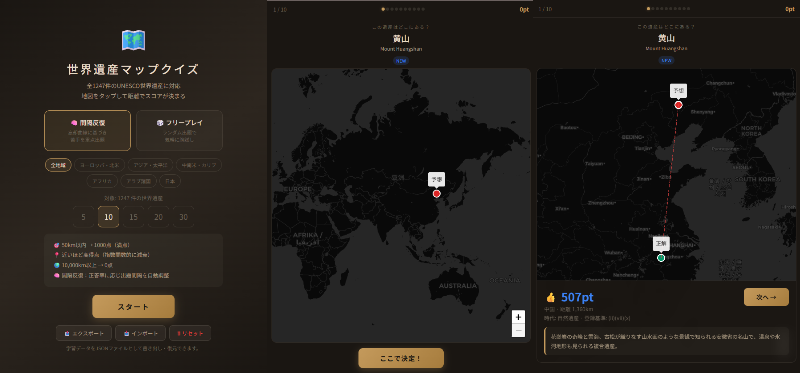
Demo: https://wh.tompython.com/
Source Code: GitHub
Features
All 1,247 UNESCO Sites
The app covers all 1,247 UNESCO World Heritage Sites registered as of 2025. Each site includes Japanese name, English name, country, coordinates, historical era, inscription criteria, and a short description.
Distance-Based Scoring
Tap the map to place your guess, and a score is calculated based on the distance to the actual location.
- Within 50 km → 1,000 points (perfect)
- Exponential decay with distance (
1000 × exp(-d/2000)) - Over 10,000 km → 0 points
The haversine formula is used for accurate great-circle distance calculation, so scores remain fair even for sites near the poles.
Spaced Repetition Mode
I implemented spaced repetition learning based on the SM-2 algorithm. The Easiness Factor (EF) and review interval for each site are updated according to your score, so sites you struggle with are repeated more frequently.
- Score ≥ 400 (≈ within 1,800 km): Counted as correct → review interval extends
- Score < 400: Counted as incorrect → interval resets for re-study
There's also a Free Play mode for casual random quizzing.
Region Filter
1,247 sites worldwide is a lot, so I added region filters.
- Europe & North America / Asia & Pacific / Latin America & Caribbean / Africa / Arab States / Japan
These follow UNESCO's regional classification, with Japan separated out as its own country filter.
Question Count
Choose from 5, 10, 15, 20, or 30 questions. Quick 5-question sessions for a commute, or a deep 30-question run when you have more time.
Learning Data Management
Spaced repetition data is stored in localStorage. The app auto-detects storage availability and falls back gracefully for private browsing mode. You can also export and import data as JSON files for transferring between devices.
Tech Stack
Single HTML Architecture
The entire app is contained in a single HTML file. No frameworks, no build tools — just Vanilla JS. Here's why:
- Simple deployment: Just host static files and you're done
- Easy offline support: Minimal files to cache with Service Worker
- Data size: Embedding 1,247 sites as a JS array literal is about 580 KB — well within reason after gzip
Map: Leaflet + CARTO
I chose Leaflet for the map library, with CARTO's dark theme tiles (dark_all). The dark aesthetic pairs well with the quiz app's UI, and site markers stand out visually.
PWA Support
With a Service Worker and Web App Manifest configured, the app works as a PWA (Progressive Web App). Add it to your home screen and it behaves like a native app.
Implementation Notes
Scoring with the Haversine Formula
Great-circle distances are calculated using the haversine formula.
function haversine(lat1, lng1, lat2, lng2) {
  const R = 6371;
  const dLat = (lat2 - lat1) * Math.PI / 180;
  const dLng = (lng2 - lng1) * Math.PI / 180;
  const a = Math.sin(dLat/2)**2
          + Math.cos(lat1*Math.PI/180) * Math.cos(lat2*Math.PI/180)
          * Math.sin(dLng/2)**2;
  return R * 2 * Math.atan2(Math.sqrt(a), Math.sqrt(1-a));
}
The decay curve exp(-d/2000) gives a nice balance: perfect score within 50 km, about 780 points at 500 km, 370 at 2,000 km, and 80 at 5,000 km — so getting the right continent but wrong country still earns a decent score.
SM-2 Based Spaced Repetition
I adapted SuperMemo's SM-2 algorithm to work with distance scores. Scores from 0–1,000 are mapped to quality ratings (0–5), which drive EF and interval updates.
function updateSR(id, score) {
  const item = getSR(id);
  const q = scoreToQuality(score); // 900→5, 700→4, 400→3, 150→2, 50→1, 0→0

  if (q >= 3) {
    if (item.reps === 0) item.interval = 1;      // First time: 1 day
    else if (item.reps === 1) item.interval = 3;  // Second time: 3 days
    else item.interval = Math.round(item.interval * item.ef);
    item.reps++;
  } else {
    item.reps = 0;
    item.interval = 1; // Reset
  }

  item.ef = Math.max(1.3, item.ef + (0.1 - (5-q) * (0.08 + (5-q) * 0.02)));
  item.nextReview = Date.now() + item.interval * 86400000;
}
Auto-Detecting Storage Availability
Some browsers disable localStorage in private browsing mode. The app performs a write test to check availability, falling back to in-memory storage if needed. When running in private mode, a warning is displayed in the UI prompting the user to export their data.
Leaflet Map Instance Management
Since the app switches screens in a SPA-like fashion, replacing the DOM can orphan the Leaflet map instance. ensureMap() checks whether the existing map container is still in the DOM, and recreates it if it's been detached.
function ensureMap() {
  if (map && !document.body.contains(map.getContainer())) {
    map.remove();
    map = null;
  }
  if (map) return;
  const el = document.getElementById('map');
  if (!el) return;
  map = L.map(el, { center: [20, 0], zoom: 2, /* ... */ });
}
Closing
More than just memorizing locations, I wanted to build an app where you can enjoy the discovery of "oh, that site is there?" while browsing the map. Play with spaced repetition long enough and you'll naturally develop a stronger sense of world geography.
World Heritage Map Quiz